
A Step-by-Step Guide to Using StreamStats and HY-8 for Effective Culvert Sizing

Proper culvert design is critical for managing stormwater, preventing flooding, and protecting infrastructure. For water resources engineers, combining the power of USGS StreamStats and FHWA HY-8 software offers a practical, efficient way to accurately size culverts. This is ignoring the fact that both of these are free to use. This guide walks you through the process, from gathering watershed data to running hydraulic models, helping you make informed decisions with confidence.
Understanding the Tools: StreamStats and HY-8
Before diving into the steps, it’s important to understand what each tool offers:
StreamStats is a web-based application developed by the USGS that provides streamflow statistics and watershed characteristics. It helps you quickly estimate peak discharge values for your site without extensive fieldwork. It is a point and click approach to generating design discharges based on regression equations.
HY-8 is a hydraulic modeling software designed to analyze culvert hydraulics. It simulates flow through culverts, helping you evaluate different sizes, shapes, and materials to find the best fit. It was designed by the Federal Highways Administration (FHWA), and mimics Hydraulic Design Series 5: HYDRAULIC DESIGN OF HIGHWAY CULVERTS.
Together, these tools streamline the culvert sizing process by combining hydrologic data with hydraulic analysis.
Step 1: Define Your Project Site and Objectives
Start by clearly identifying the location where the culvert will be installed. Gather basic information such as:
Stream name and type (perennial or intermittent)
Watershed boundaries
Existing infrastructure and road alignment
Design storm frequency (e.g., 10-year, 25-year, 100-year events)
Knowing your design objectives upfront ensures you select the right parameters and design criteria.
Step 2: Use StreamStats to Obtain Peak Flow Data
Access StreamStats online, linked here and follow these steps:
Locate your site on the map interface by entering coordinates or zooming to the project area.
Select the region you are in. I am going to walk through a site in Birmingham, AL, along Shades Creek.

Delineate the watershed by clicking on a blue water line (note: you have to zoom in far enough for the streamlines to show up. This will delinate the upstream watershed.

Select regression scenarios. Peak-Flow Statistics is the most frequent and what we will use, but there are other useful scenarios. This will automatically populate the required inputs for the regression, which in the state of Alabama are only drainage area and percent developed (CONTDA & URBAN)
Retrieve peak flow statistics for your site by openign the report and saving in the appliable project folder. StreamStats provides flow estimates for various return periods (e.g., 2-year, 10-year, 50-year, 100-year). You will need to use judgement in a few items
Is the watershed delineation reasonable? This uses a coarse, 10-meter DEM and the HUC layers.
Should I apply urban, small stream, or rural regression equations. Note the limits for each, and reference the Alabama Regression Documents SIR 2020-032, Magnitude and Frequency of Floods in Alabama, 2015, linked here
Download or note the peak discharge values relevant to your design storm.

For example, if your project requires a 25-year design storm, use the corresponding peak flow value from StreamStats as input for HY-8.
Step 3: Gather Site-Specific Data for HY-8
To build an accurate hydraulic model, collect the following site data:
Culvert length and slope
Streambed elevation and profile
Road embankment height and width
Existing culvert dimensions (if any)
Material type (e.g., concrete, metal)
Tailwater conditions (downstream water surface elevation)
Field surveys or existing engineering drawings can provide this information. If this is a high-level analysis, you can do most of this with a desktop version and LiDAR.
Step 4: Set Up Your HY-8 Model
Open HY-8 and create a new project (downloadable from this site). A useful video from FHWA is linked here. The full HDS 5 is linked here. Input the site data collected in Step 3:
Enter culvert geometry: shape, size, length
Define inlet and outlet conditions
Input stream slope and roughness coefficients
Specify tailwater elevation

Next, enter the peak flow values from StreamStats as the design flow for your model. Always click on the help icon when confused, there are some really useful graphs and instructions on where to get the required input data from.
Step 5: Run Hydraulic Simulations
Run the HY-8 model to simulate water flow through the culvert. The software will calculate:
Water surface elevations upstream and downstream
Culvert capacity and flow velocity
Headwater depth and potential for overtopping
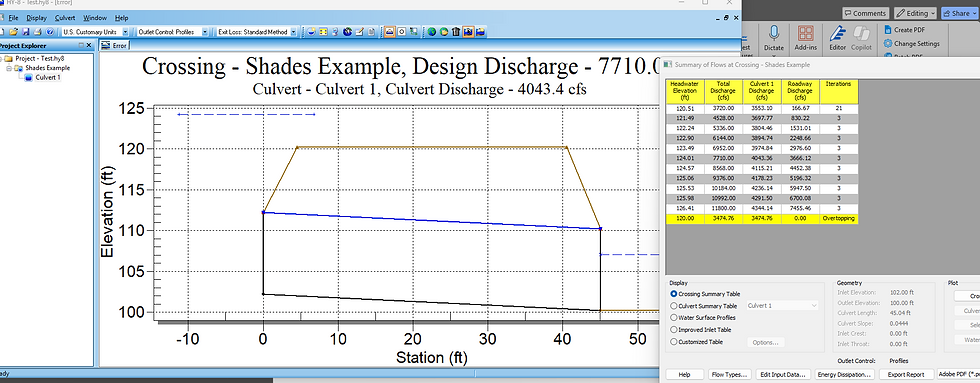
Review the results carefully. If the headwater depth exceeds allowable limits or the culvert capacity is insufficient, adjust the culvert size or shape and rerun the model.
Step 6: Evaluate Results and Select Culvert Size
Compare different culvert options by running multiple simulations with varying sizes or materials. Consider:
Hydraulic performance (capacity, velocity)
Cost and constructability
Environmental impact (fish passage, sediment transport)
Choose the culvert size that meets design criteria while balancing budget and environmental concerns.
Step 7: Document Your Design and Prepare Reports
Compile your findings, including:
StreamStats peak flow data and watershed maps
HY-8 input parameters and output summaries
Design decisions and rationale
Clear documentation supports project approvals and future maintenance.
Using StreamStats and HY-8 together simplifies culvert sizing by combining reliable hydrologic data with detailed hydraulic analysis. This approach reduces guesswork and helps engineers design culverts that protect infrastructure and maintain natural stream function. You could always dig in and develop a full HEC-RAS model, but it requires much more input data and time. This is a good, high-levelapproach, albeit maybe not full design-worthy. Comment below if it would be useful for me to run through a specific site and example design!
Happy Modeling!

Comments